Lead scoring from 0 to 100 with n8n and Google Sheets
Which lead gets a call first? Give each one a score with a reason you can read.
Hoàng Huy Đức · 4 min read
A lead who asked for a quote this morning should not wait behind one who only said hello. A score from 0 to 100 sets the order, and every point comes with a reason the team can read, check and change.
This guide builds that in n8n and writes every lead to Google Sheets. Every step below was run on a self-hosted n8n 2.41.4 with six sample leads before it was written down.
The rules
Each rule adds or removes points. The score is kept between 0 and 100.
- Source: referral 25, website form 20, Facebook Lead Ads 15, anything else 5.
- Team size: 50 people or more 20, 10 to 49 people 15, fewer than 10 people 5.
- Budget: a budget given 20, “not sure yet” 5.
- Phone number: 10.
- Buying words in the message (quote, pricing, demo): 15.
- Personal email (Gmail, Yahoo, Hotmail) instead of a company address: minus 10.
Then three tiers: hot from 70, warm from 40 to 69, cold under 40. Hot means a person calls within the hour.
The workflow
- InputA lead arrivesA form posts to the webhook.
- RuleScorePlain rules, each with a reason.
- RuleTierHot, warm or cold.
- OutputLoggedA row in Google Sheets.
- PersonA person callsHot leads, within the hour.
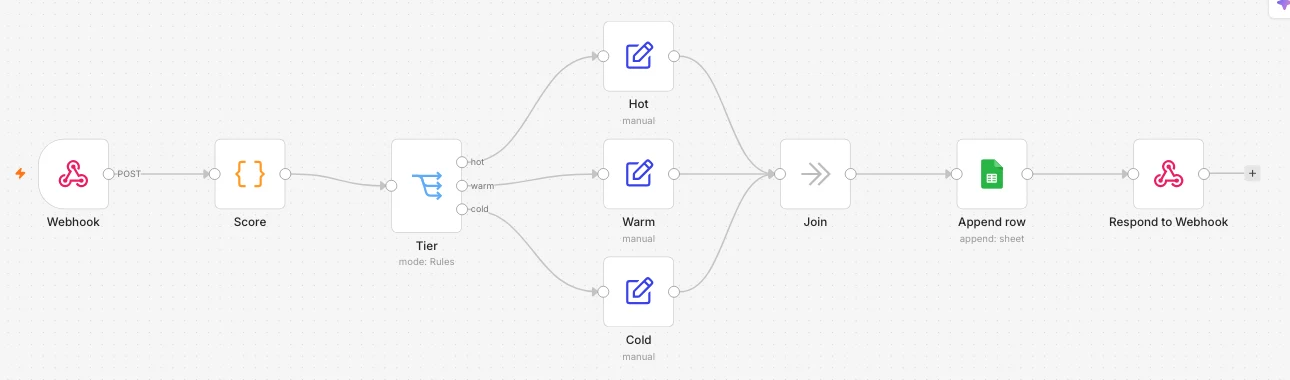
Build it in n8n
- Webhook. Method POST, path
lead, and respond “Using ‘Respond to Webhook’ node”. Point your forms at its production URL. - Code node “Score”. Paste the rules below. Each rule adds its points and a reason, so the team can see why a lead scored what it did. The reason labels are in Vietnamese, as tested; change the text in quotes to your own.
const b = $input.item.json.body || {};
const s = (v) => String(v ?? '').toLowerCase().trim();
let score = 0;
const reasons = [];
const add = (pts, why) => { score += pts; reasons.push(`${why} (${pts > 0 ? '+' : ''}${pts})`); };

// 1. Lead source
const src = s(b.source);
add({ referral: 25, website_form: 20, facebook_lead_ads: 15 }[src] ?? 5, `Nguồn: ${src || 'khác'}`);

// 2. Team size
const team = Number(b.team_size);
if (team >= 50) add(20, `Đội ${team} người`);
else if (team >= 10) add(15, `Đội ${team} người`);
else if (team > 0) add(5, `Đội ${team} người`);

// 3. Budget
const budget = s(b.budget);
if (budget === 'chưa rõ') add(5, 'Ngân sách chưa rõ');
else if (budget) add(20, 'Đã có ngân sách');

// 4. Phone number
if (s(b.phone)) add(10, 'Có số điện thoại');

// 5. Buying words in the message
if (/báo giá|giá|demo|triển khai|quote|pricing/i.test(b.message || '')) add(15, 'Hỏi giá/demo/triển khai');

// 6. Personal email instead of a company address
if (/@(gmail|yahoo|hotmail)\./.test(s(b.email))) add(-10, 'Email cá nhân');

score = Math.max(0, Math.min(100, score));
return { json: { name: b.name || '', source: src || 'khác', score, reasons } };- Switch node “Tier”. Mode Rules, three outputs renamed
hot,warmandcold:scoreis at least 70;scoreis at least 40 and below 70;scoreis below 40. - One Set node per tier. Add
tierandnext_action, for example “call within 1 hour”, “email today” and “add to the nurture list”. - Join. A No Operation node that the three tiers flow into, so the next steps are built once.
- Google Sheets, Append row. Map the columns time, name, source, score, tier, next_action and reasons.
- Respond to Webhook. Return
score,tier,next_actionandreasonsas JSON, so the form or the person testing sees the result at once.
Publish the workflow and send it a test lead:
curl -X POST https://your-n8n/webhook/lead -H 'content-type: application/json' \
  -d '{"name": "Lead mẫu 1", "email": "an@congty-mau.example", "source": "referral", "team_size": 60, "budget": "200 triệu", "phone": "0900000001", "message": "Cần báo giá và demo triển khai cho 60 người"}'
The tested run answered:
{"score":90,"tier":"hot","next_action":"Gọi trong 1 giờ","reasons":["Nguồn: referral (+25)","Đội 60 người (+20)","Đã có ngân sách (+20)","Có số điện thoại (+10)","Hỏi giá/demo/triển khai (+15)"]}What the six test leads scored
- 90, hot. A referral from a team of 60 with a budget, a phone number and a request for a quote.
- 50, warm. A website form from a team of 12, budget not sure yet, with a phone number.
- 0, cold. Another source, a team of 3, a Gmail address.
- 5, cold. Only a name: the rules still answer, with the “anything else” source points.
- 0, cold. 5 minus 10 would be below zero, so the score stops at 0.
- 70, hot. Exactly on the line, which counts as hot.
All six were appended to the test sheet as rows.
Three things the test ran into
- The first call after publishing failed with “The requested webhook “POST lead” is not registered.” A few seconds later the same call worked. Wait a moment before your first test.
- n8n would not publish a Google Sheets node without a credential. Connect Google first, or keep that node switched off until you do.
- One append got a Google 502 error, and sending the same lead again worked. Turning on Retry On Fail in the node’s settings makes n8n try again for you.
Self-hosting it too? This n8n version needs Node.js 24 or newer.
Connect Google Sheets
The test connected Sheets with an existing Google OAuth client. For a new self-hosted setup, n8n’s guide lists the steps: create a Google Cloud project and turn on the Google Sheets API, set up the OAuth consent screen, create an OAuth client of type “Web application” with n8n’s redirect URL, then paste its ID and secret into the credential and sign in with Google.
Keep a person on the decision
- The score orders the queue; people decide. A hot lead gets a call from a person, not an automatic message.
- Read the low scores once a week. Open five cold leads and ask whether a rule missed something. Change the points, not the people.
- Start from the tested file. Download the workflow and import it into n8n. The Google Sheets step is switched off until you connect your own account.
Where lead scoring shows up in Đức’s work
Hoàng Huy Đức designs the automation layer under marketing and sales at Savyu, including lead scoring and routing (LinkedIn, September 2026). See the services for what a project like this looks like.